Integrated Payment Hub Solution
A single source of payment processing that connects your ERP, payment gateway, customer portal, and virtual terminal. Shorten receivables, improve customer satisfaction, and save money.
Customer Portal
Self-service portal for viewing invoices, making payments, updating billing info, and managing saved payment methods.
Virtual Terminal
CSR-facing interface for processing payments on behalf of customers with account selection and user emulation.
Clarity Connect Integration
Built-in middleware that synchronizes customers, invoices, and payments between your ERP and the payment portal.
PCI Compliant
Tokenized card storage through your payment gateway ensures no card data is ever stored within the system.
Gateway Agnostic
Works with virtually any payment gateway and processor. We can recommend partners for competing offers.
Invoice Quick Pay
Tokenized email links let customers pay invoices with a single click, without logging into the portal.
Technology Stack & Deployment
Built on modern, enterprise-grade technologies with a single-tenant deployment model that gives each client a fully customizable platform instance.
Modern Tech Stack
Built on .NET with C# on the back-end and Remix (React-based) with JavaScript and Tailwind CSS on the front-end. SQL Server or PostgreSQL for data persistence. This enterprise-grade stack delivers performance, security, and maintainability.
Single-Tenant Deployment
Each client receives a dedicated platform instance with its own database, custom theme, and infrastructure. Unlike shared SaaS platforms, single-tenant installations allow for deep customizations, custom integrations, and full control of the environment.
Updates Without Disruption
Single-tenant installations still receive core platform updates, security patches, and new features — all without affecting client customizations. This is achieved through a client override system that keeps custom code separate from the core codebase.
Self-Service Payment Portal
A standalone customer-facing portal with dashboard, invoice management, payment processing, wallet management, and full account settings.
Dashboard
At-a-glance view with open credits, open invoices, past due balance, and account balance. Quick summaries of recent invoices, credits, payments, payment methods, and addresses.
 Click to enlarge
 Watch Demo
Invoice Management
View, filter, and pay invoices with search by number, date range, and status. Detail views show line items, balance due, and totals. Automated email links for quick pay.
 Click to enlarge
Invoice Details
All details associated with each invoice are pulled directly from your ERP and displayed in the portal for customers to review, including line items, balance due, status, due dates, and totals.
 Click to enlarge
PCI Wallet
Manage tokenized credit cards and ACH bank accounts. Cards saved to the wallet are available for selection when making payments. Full address book for billing entries.
 Click to enlarge
 Watch Demo
Account Settings
My Profile for user info management, Account Profile for company details, and full Address Book for billing addresses. Automated invitation emails for new users synced from ERP.
 Click to enlarge
 Watch Demo
Account Credits
Apply account credits toward invoice payments. Credits are synced from your back-office applications via Clarity Connect for seamless B2B payment flexibility.
 Click to enlarge
 Watch Demo
Transaction History
Complete transaction log with payment history, status tracking, and detailed payment records for every invoice payment made through the portal.
 Click to enlarge
 Watch Demo
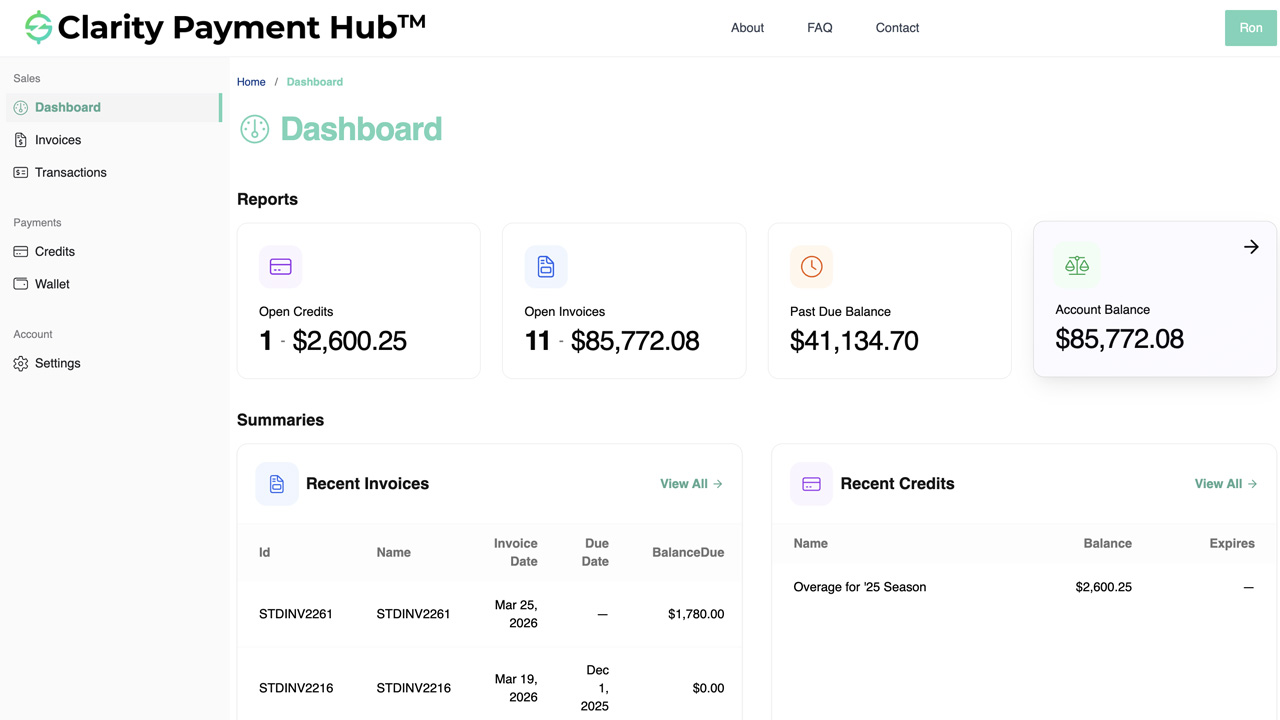
Check Account Balance
View your current account balance pulled live from the ERP, showing outstanding amounts, credits, and payment history at a glance from the dashboard.
 Click to enlarge
 Watch Demo
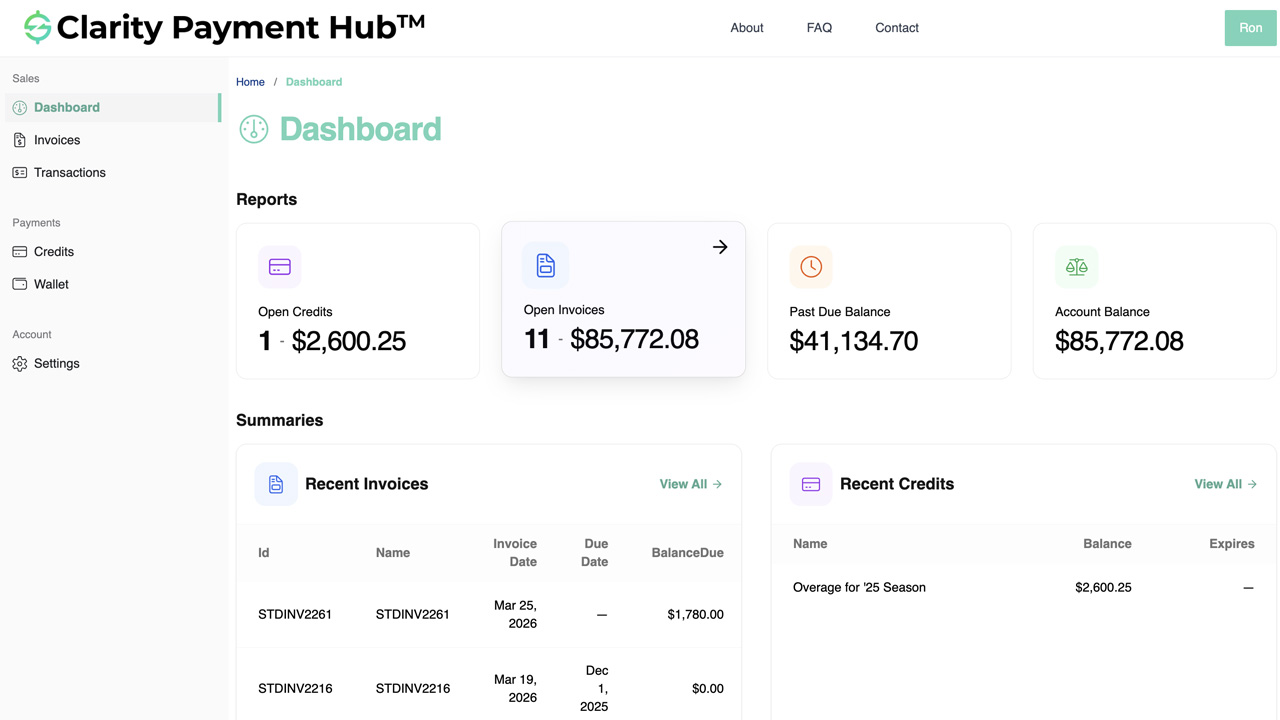
Check Open Invoices
View all open and unpaid invoices in a filterable dashboard, synced in real time from your ERP. Sort by date, amount, or status to quickly find what needs attention.
 Click to enlarge
 Watch Demo
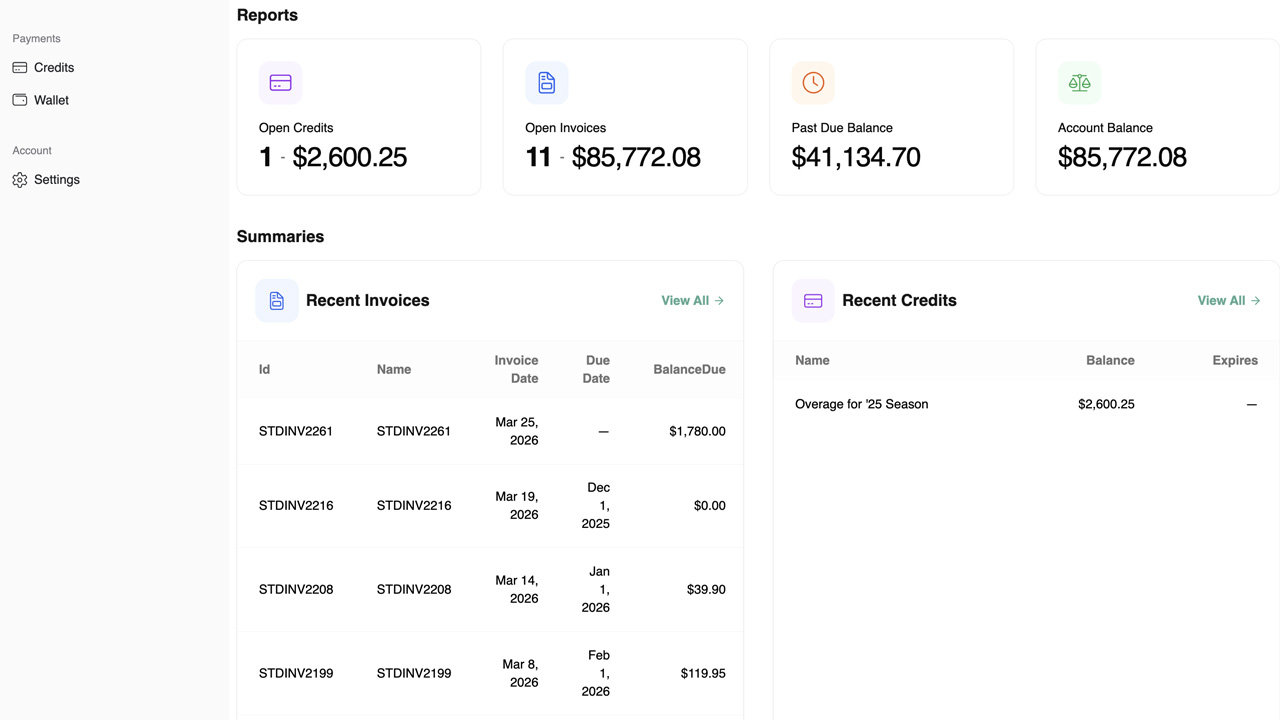
Check Recent Invoices
Quick view of the most recent invoices issued to the customer, allowing fast review of new charges and upcoming payment due dates without navigating the full invoice list.
 Click to enlarge
 Watch Demo
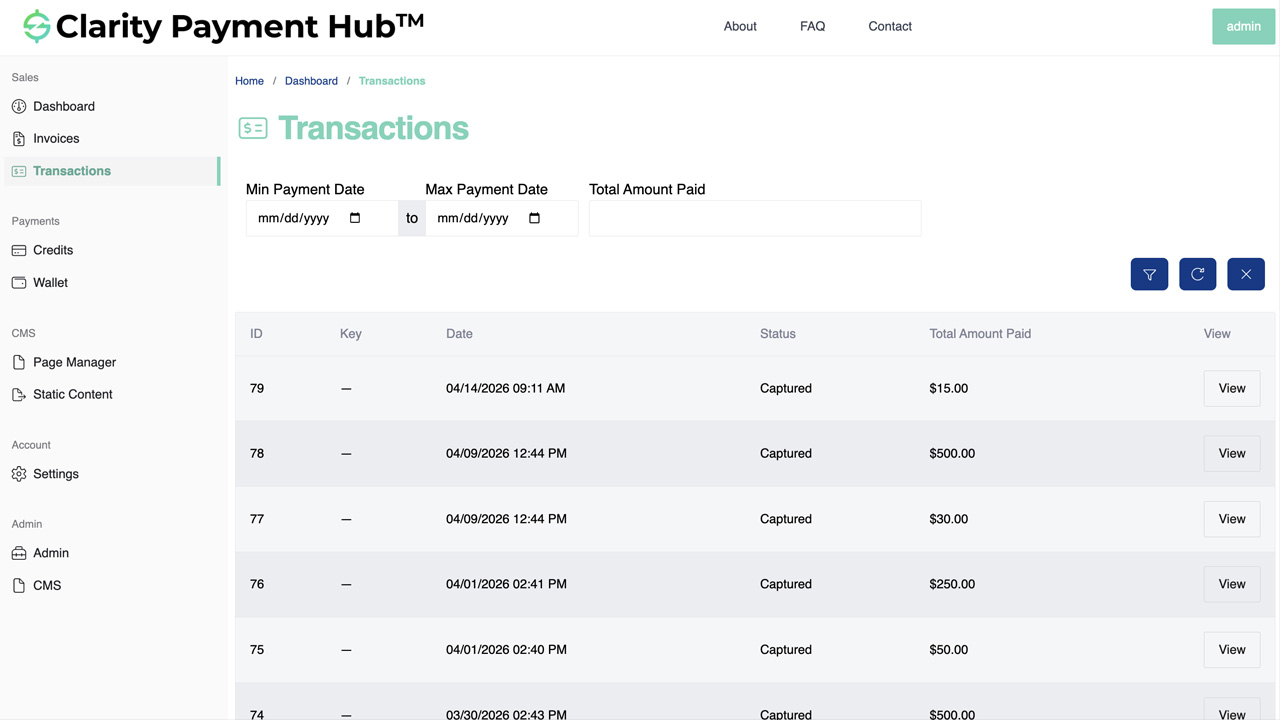
Check Recent Payment
View the most recent payment with full details including amount, method, date, and the invoice it was applied to — visible right from the dashboard.
 Click to enlarge
 Watch Demo
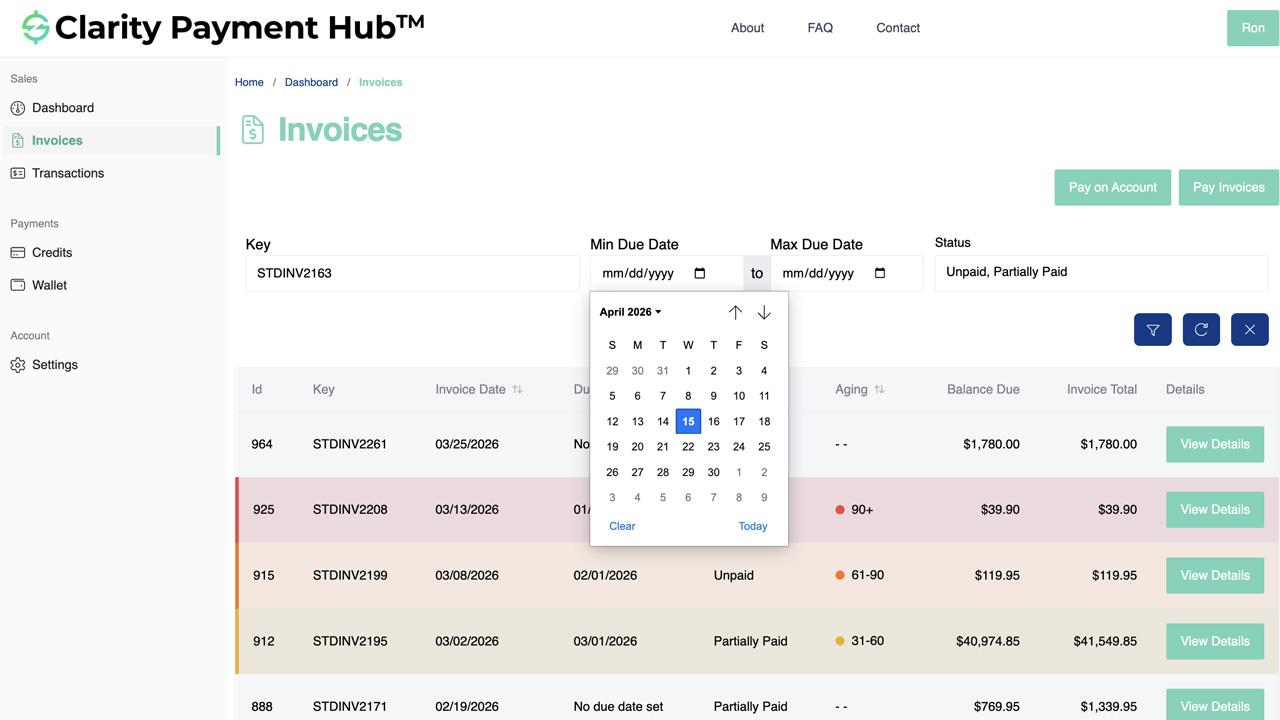
Find an Invoice
Powerful search and filtering to locate specific invoices by number, date range, amount, or status. Designed for customers with high invoice volumes who need to find a specific record fast.
 Click to enlarge
 Watch Demo
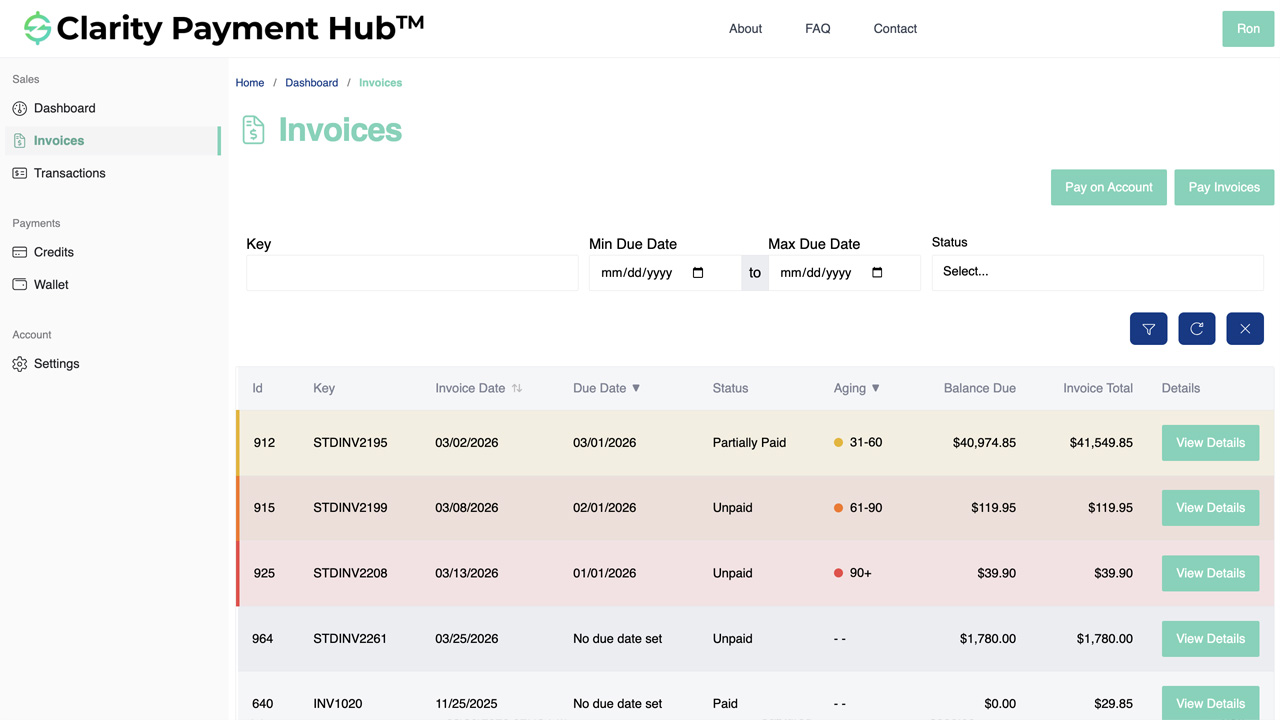
View Invoice Aging
Aging report showing invoices grouped by age buckets — current, 30-day, 60-day, and 90+ day — giving customers full visibility into their outstanding balances over time.
 Click to enlarge
 Watch Demo
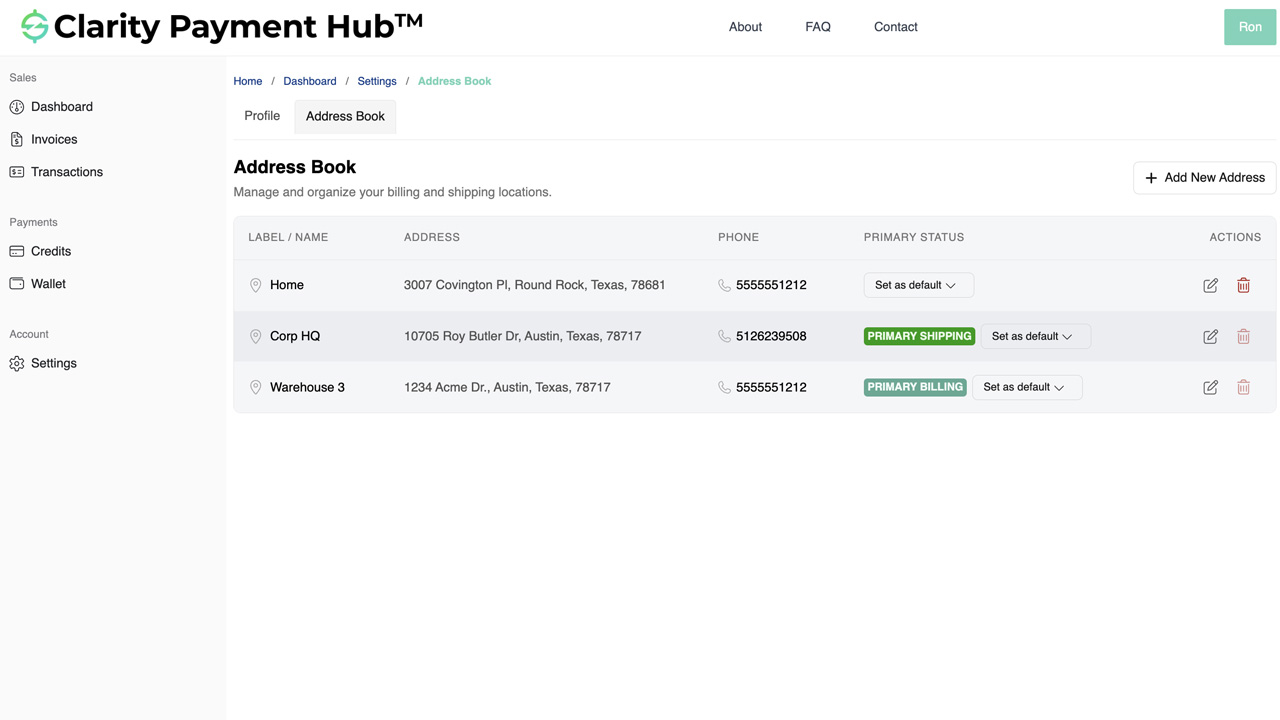
Add Address to Profile
Customers can add, edit, and manage shipping and billing addresses directly in the portal. Address changes sync back to your ERP in real time via Clarity Connect.
 Click to enlarge
 Watch Demo
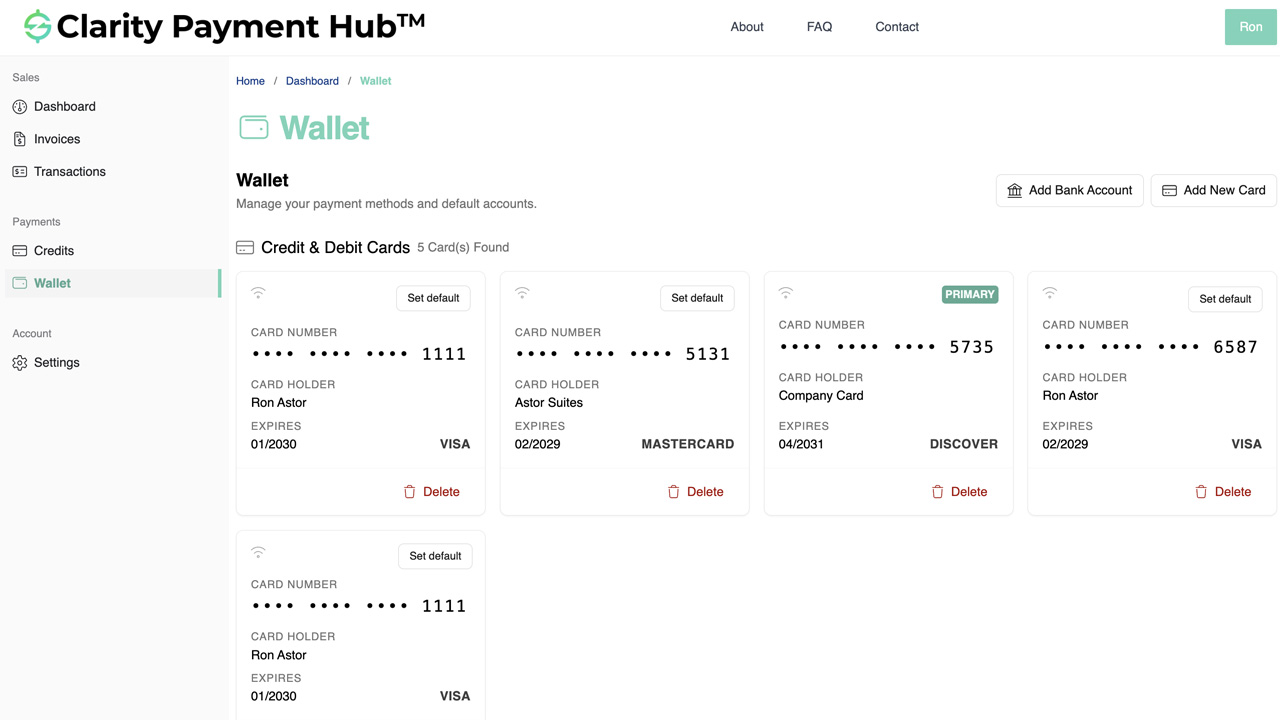
Add Default Billing Method
Set a default billing method on the account for faster checkout. The default payment method is automatically selected when paying invoices, streamlining the payment flow.
 Click to enlarge
 Watch Demo
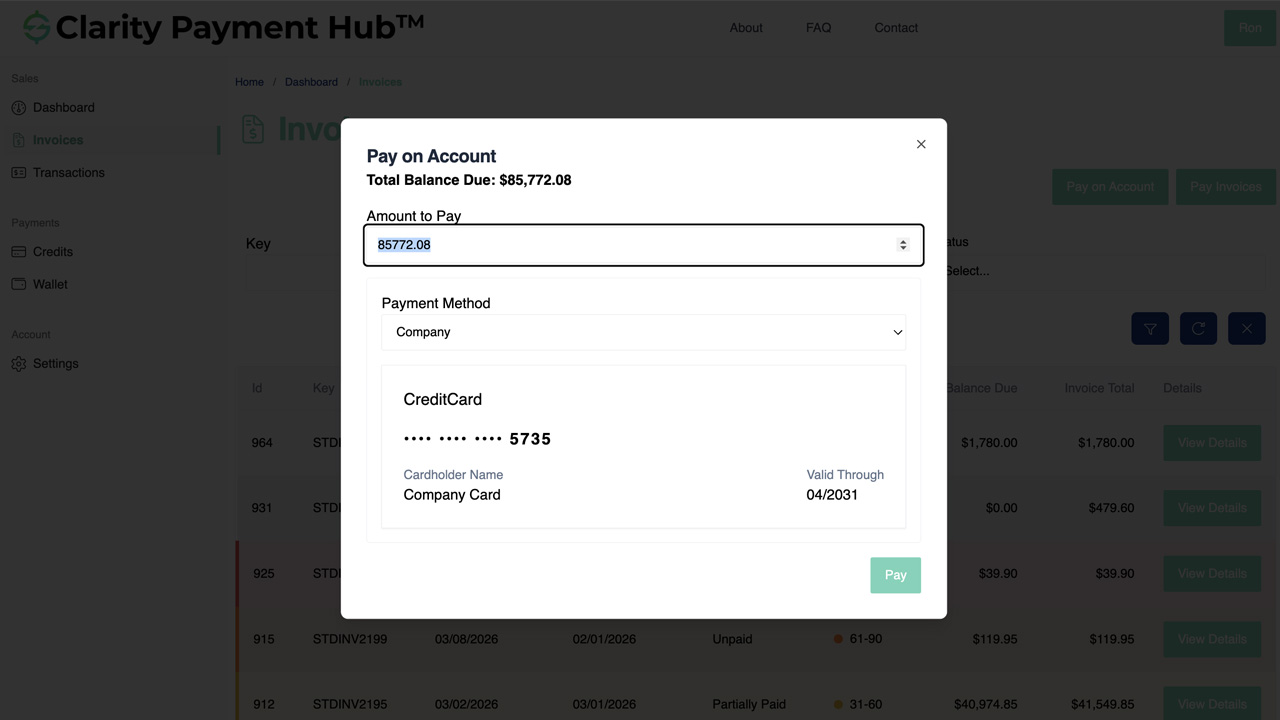
Pay on Account
Make a payment against the overall account balance rather than a specific invoice. Useful for applying general credits or pre-payments that will be allocated later by your AR team.
 Click to enlarge
 Watch Demo
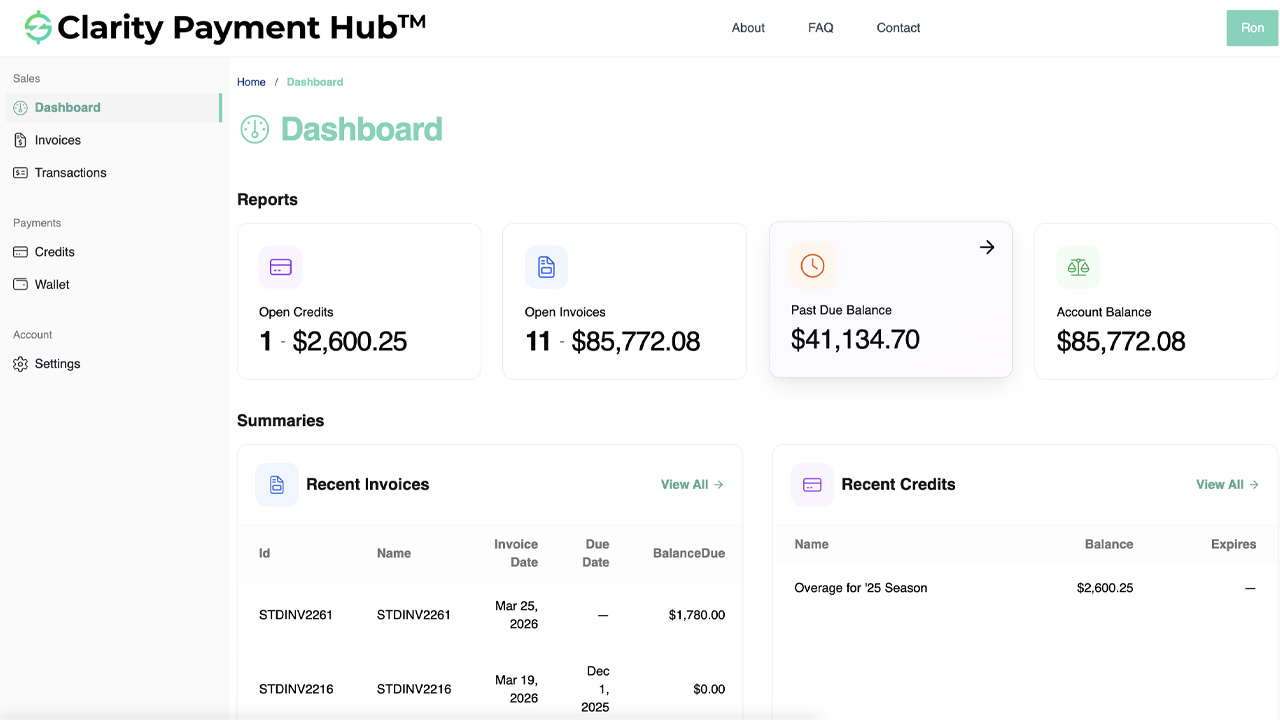
Pay Past Due Invoice
Self-service resolution of overdue balances without awkward phone calls. The portal surfaces past-due invoices prominently and streamlines the payment process for quick resolution.
 Click to enlarge
 Watch Demo
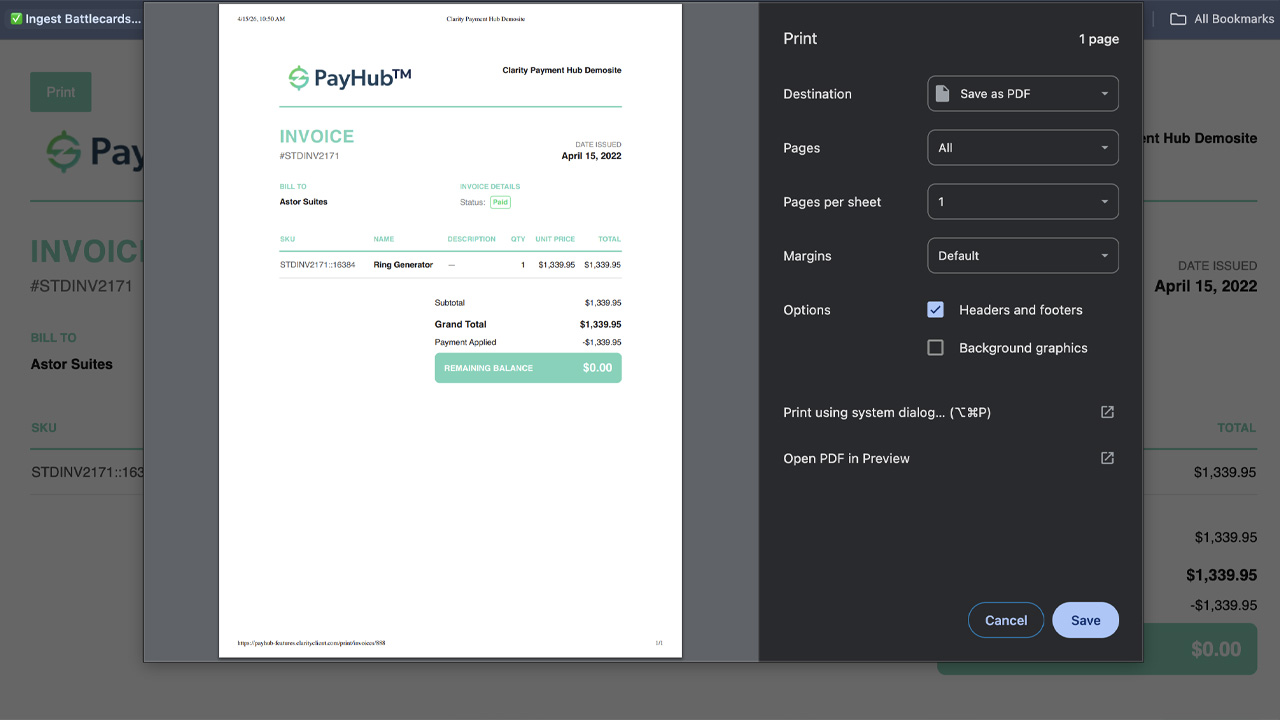
Print an Invoice
Print-ready invoice view that can be downloaded as PDF or printed directly from the portal, supporting internal approval workflows and record-keeping requirements.
 Click to enlarge
 Watch Demo
Flexible Payment Options
Full, partial, and bulk payment support with credit card, ACH, and account credit payment methods. All payments are posted back to your ERP automatically.
Full & Partial Payments
Balance due auto-populates for full payment. Partial payments allow customers to pay less than the balance due, with the option to disable this and force full payment.
 Click to enlarge
Bulk Payments
Select multiple unpaid invoices, specify payment amounts for each, and submit a single payment that covers all selected invoices. Can be enabled or disabled per client.
 Click to enlarge
ACH / eCheck Payments
Configure ACH/eCheck to allow customers and CSRs to add bank accounts to the wallet. Capability depends on your PCI provider and payment gateway.
 Click to enlarge
Surcharging
Retrieve the credit card BIN from the PCI provider, pass it to the surcharge provider to calculate the fee, and apply the surcharge amount to the customer's payment total. Note: surcharge providers will typically assess a fee for their services.
 Click to enlarge
 Watch Demo
Dual Pricing
Display two separate prices (cash and card) up front, often framing the cash price as a discount. This leverages the surcharge module to apply fees to card payments at the time of transaction. Alternatively, some clients opt for a "convenience fee" model, which adds a flat fee to transactions using non-standard payment methods. Note: convenience fees have stricter regulatory rules and are limited to specific "alternative" channels.
Level II & III Processing
Include enhanced transaction data for better B2B interchange rates. Fill in Level II/III fields from your ERP or systematically to meet all data requirements.
 Click to enlarge
Payments Posting
All payments automatically posted back to your ERP via Clarity Connect. Payment updates sent to customers via the portal and email notifications.
Virtual Terminal for CSRs
A clone of the customer portal designed for your Customer Service Representatives to search for, select, and make payments on behalf of customers.
Account & Contact Selection
CSRs use the account search field and user dropdown to select which customer they're assisting. Account associations control which customers show up, allowing full or subset visibility.
 Click to enlarge
Affiliate Role Assignment
Assign specific account groups to CSRs via the Affiliate role. Backup CSRs can be temporarily given access to cover vacations or absences.
CSR Payment Processing
Full payment capabilities while emulating a customer. CSRs can access saved cards, add new cards, filter invoices, and process payments against any invoices for the selected account.
Optional Upgrades
Extend PayHub with additional capabilities including live capture methods, recurring billing, refund processing, embeddable elements, and custom reporting.
Live Capture Methods
Three options: Virtual Terminal phone capture, physical card reader integration (Ingenico, MagTek, Square), and POS system integration for in-person transactions.
ERP-Embedded Payments
Adds a link within your ERP that displays a pop-up used to process payments. The payment total and customer are pre-populated into the payment pop-up, leveraging our off-the-shelf UI. Includes an authentication hook that logs the ERP user into the portal, as well as a callback hook to the ERP once payment has been processed to apply the payment in real-time. Note: these customizations can be overridden by the ERP company if a client override is not provided when embedding the platform.
 Click to enlarge
Recurring Billing
Store a default payment method for processing recurring subscription payments automatically on a configured schedule.
Refund Processing & Batch Capture
CSRs can post credits back to customer cards. Batch capture for authorization-first workflows, processing multiple order payments from your ERP before or after fulfillment.
Embeddable Elements & SSO
Embed PayHub payment elements within existing websites or internal ERP/CRM applications. SSO integration for seamless authentication with your existing portal login.
Custom Reporting
Built-in SQL reporting engine for custom payment, transaction, and invoice reports tailored to your business needs.
Advanced Design & Styling
Fully customizable header, footer, portal, and accompanying website design. Custom branding with your logo, colors, and content beyond the standard template.
Standard Implementation Process
A structured, three-phase project lifecycle designed to deliver your Payment Hub solution on time and on budget, from initial discovery through go-live and beyond.
Phase 1: Discovery & Base Installation
The project kicks off with a call to align stakeholders, followed by the base platform installation. Technical discovery meetings identify your specific needs, which inform documentation, designs with your branding, and the architecture plan with refined estimates.
- Kickoff call and base installation
- Needs analysis and technical discovery meetings
- Documentation and designs/wireframes (client branding)
- Architecture planning and re-estimates
- Typically 1 - 2 weeks; up to 3 - 4 weeks for highly complex projects
Phase 2: Customizations (Development)
Development follows an agile process with sprint planning every two weeks. Each sprint includes development, build testing, code review, bug fixes, and client acceptance. The phase concludes with final QA including validation, user story confirmation, and user acceptance testing.
- Sprint planning every 2 weeks (agile methodology)
- Build testing, code review, and bug fixes each sprint
- Client acceptance and final QA with UAT
- 2 - 3 weeks for off-the-shelf; 8 - 20 weeks for custom projects
- Complexity varies by gateway, portal, POS, and ERP integration
Phase 3: Go-Live
The final sprint covers client acceptance, production deployment, and security validation. Post go-live, we discuss ongoing support needs, update schedules, future enhancements, and periodic audits or code reviews.
- Final client acceptance and push to production
- Validate and secure the live environment
- Discuss support, updates, enhancements, and audits
- Runs during the last sprint of the development lifecycle